

== VS === ? The Evil or the Angel ?
This article sorts out truthy and falsy value checks and implicit conversion, compares the differences between the loose equality and strict equality operators, explains common unexpected results, and explains that loose equality can be safely used when types are clear.
If you are a front-end developer, then you will inevitably run into situations like this
console.log(0 == false); // true
console.log('' == false); // true
console.log([] == false); // true
console.log(0 === false); //false
console.log('' === false); //false
console.log([] === false); // false
Developers who are unfamiliar with JavaScript might ask: == Why, since there is
== , do we still need === for? What is the difference between the two? ==== As the name suggests, it is the equality operator. And === is strict equality, also called equality in strict mode. From the examples above, you can actually see that there is quite a big difference between the two.In JavaScript,
== the operator performs an implicit type conversion when making a comparison, and this conversion is invisible to developers. The result of the comparison can also be as magical as in the previous examples. And === the operator performs a strict comparison. If the types of the two variables are inconsistent, or if the types are consistent but the values are different, it will return false 。== the operator actually produces unexpected results in many places. If you think the examples above are not too hard to understand, then take a look at the following example:if ([0]) {
console.log([0] == true); // false
console.log([0] == false); // true}
if ('something') {
console.log('something' == true); // false
console.log('something' == false); // false}Hmm, are you starting to find it magical too?
Why is
if ([0]) holds true, while [0] == true is false ? By the same logic, why if ('string')holds true, while 'string' == true is false? The strangest thing is 'string' == false actually is also false?Yes, this
== operator seems very strange, and its results are often unexpected, so many JavaScript experts are now calling for people not to use == operator for comparison, but instead to use === for comparison. Because compared with == speaking,===the results of the operator are much more reliable—or rather, its results can be clearly predicted in advance.When I first started learning JavaScript, I came across quite a few claims about this. So at first I firmly believed them, and I kept
== at a respectful distance. In short, for any comparison operation, I would use === rather than using == . I would even tell the friends around me that using == for comparison is an unqualified way of writing code.Although using
=== the operator works perfectly well in everyday development, and there is nothing particularly noteworthy about it. But as for == the operator, I knew nothing at all. I only knew that implicit type conversion would occur before the comparison. I once wondered about it too, and I once wanted to figure out the mystery behind it and master it deeply, but in the end I was too lazy, and later I no longer had any desire to understand it.It was not until later that I came across anarticle, and only then did I realize how absurdly wrong my original thinking had been, and that the
==operator in JavaScript is actually not hard to understand at allAlright, I've rambled on enough; now let's get to the point.
In the example above, there are two things worth examining.
The first is evaluating truthiness:
// if 表达式中的条件
if (expression) {
	// code goes here
}
// 或者三元表达式
var something = a ? 'a' : 'b';
The second is == equality comparison:
console.log(undefined == null);
console.log([0] == '');
Fortunately, today's browsers have all reached a standard when handling the operations above.
Evaluating truthiness
When evaluating truthiness, you only need to remember:
- If the variable to be tested is an object, always return
true。 - If the variable is a string and is not an empty string, return
true。 - If the variable is a number and is not
+0or-0orNaN, returntrue。 - If the variable is a boolean, return its own value. (No conversion will be performed.)
- If the variable is
undefinedornull, then returnfalse。
With these rules in place, it becomes easy to understand when we look back at the original example.
// [0] 是一个数组,而数组本质上是一个对象,因此为 `true` 。
if ([0]) {

}

// 'something' 是一个非空的字符串,因此返回 `true`。
if ('something') {

}
Judging truthy and falsy values is easy to grasp and understand. However, although the rules are easy to understand, there are still some places where mistakes are easy to make. Don't believe it? Let's take a look:
// copied from https://javascriptweblog.wordpress.com/2011/02/07/truth-equality-and-javascript/
var trutheyTester = function(expr) {
    return expr ? "truthey" : "falsey";
}

trutheyTester({}); //truthey (an object is always true)

trutheyTester(false); //falseytrutheyTester(new Boolean(false)); //truthey (an object!)

trutheyTester(""); //falseytrutheyTester(new String("")); //truthey (an object!)

trutheyTester(NaN); //falseytrutheyTester(new Number(NaN)); //truthey (an object!)
It should be noted that using
new operator always returns an object.It is also worth mentioning that when using
new to create two variables with the same value, comparing the two will always return false :var a = new String('a');
var b = new String('a');
console.log(a == b); //false
console.log(a === b); //false ,这个更不用说。Number 类型也是同样道理。Amazing, right? Some people find this unacceptable, as the results are simply too hard to predict, while others think this is a unique feature of JavaScript that, if put to good use, can be applied flexibly in some situations. What do you think?
Alright, let's take a look below at
== operator's rules:== operator
== operator is relatively more free and has a higher tolerance. It allows two variables of different types to be compared. The secret here is that **before comparison, the parser converts both variables to the same type (usually a number), and then performs the comparison.** And when the two variables are of the same type, the result is the same as the === operator. Except for undefined and nulltwo being == operator are equal, most others are first converted to numbers before comparison. Let's look at the detailed rules:(When both variables are of the same type and value, refer to the rules of the strict equality operator.)
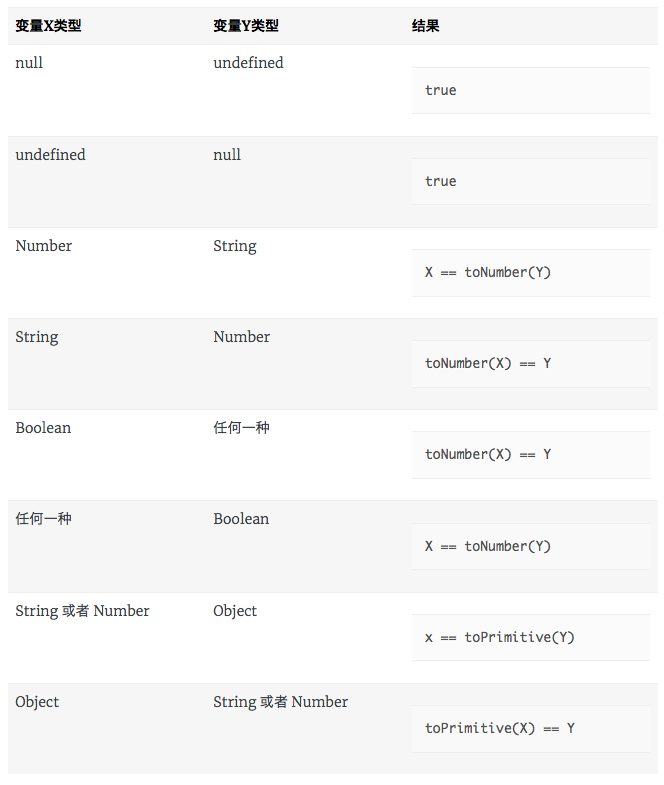
Apart from the several types shown in the table above, the rest are all
false . Among them, toNumber() and toPrimitive() are two private methods inside the parser. Their main function is to convert the passed-in arguments according to specific rules. The specific rules are as follows:toNumber() :
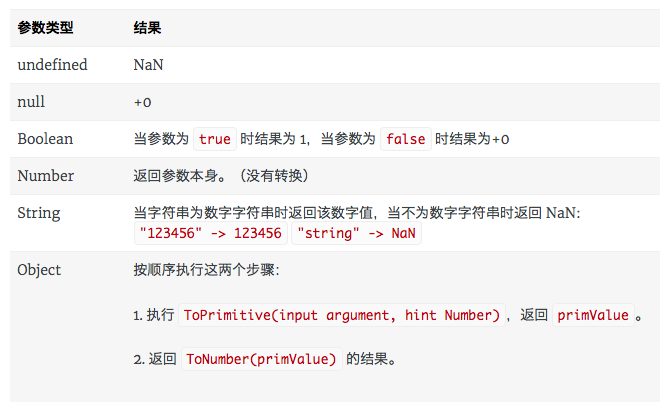
toPrimitive():
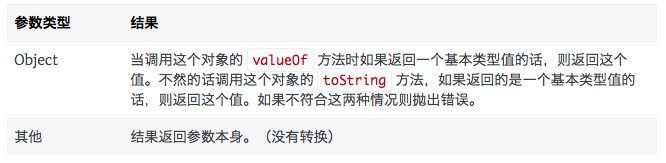
The above are the entire conversion rules. It's not actually hard, since it's just the few rules above. But saying it's not hard is also a bit of a stretch. When first encountering this kind of knowledge, it's inevitable to feel a bit lost. Next, let's demonstrate a few examples to digest it a bit.
[0] == true
[0] == true
// 首先将布尔值转换成数字
[0] == 1
// 接着将 [0] 转换成基本类型值
// 由于 [0].valueOf() 返回一个数组,不是一个基本类型值,则调用
// [0].toString() ,返回 "0"
"0" == 1
// 再将字符串转换成数字
0 == 1 // false,值不同。
[0] == false
[0] == false
// 首先将布尔值转换成数字
[0] == 0
// 接着将 [0] 转换成基本类型值。和上面的一样。于是
0 == 0 // true
'string' == true
'string' == true
// 将布尔值转换成数字
'string' == 1
// 将字符串转换成数字
NaN == 1 // false
'string' == false
'string' == false
// 将布尔值转换成数字,然后将字符串转换成数字。
NaN == 0 // false
Object's valueOf method
var obj = {
	valueOf: function () {
    	return '1';
    }
};
obj == 1
// 调用对象的 `valueOf` 方法,返回字符串
'1''1' == 1
// 将字符串转换成数字
1 == 1 // true
Object's toString method
var obj = {
	toString: function () {
    	return '1';
    }
};
obj == 1
// 调用对象的 `toString` 方法,返回字符串 '1' ,然后转换成数字
1 == 1 //true
Let's demonstrate again whether, when converting an object, it preferentially calls
valueOf or toString:var obj = {
valueOf: function () {
return 0;
},
toString: function () {
return 1;
}
};
obj == 0 // true
obj == 1 // falseFrom the above, it can be seen very intuitively that when converting an object, it preferentially calls
valueOf method.Now let's look at the case of the strict equality operator:
=== operator
=== The case of the operator is much simpler.- When the two variables are not of the same type, it always returns
false。 - When both variables are
undefinedornullit returnstrue。 - When both variables are numbers, it returns if and only if the two values are the same (but not NaN)
true. (Remember,NaN === NaNreturnsfalse。) - When both variables are strings, it returns if and only if the two values are the same
true。 - When both variables are booleans, it returns if and only if the two values are the same
true。 - When both variables are objects, it returns true if and only if the objects they reference are the same
true。 - In all other cases, it always returns
false。
So, at this point, we should understand why:
var a = new String('a');
var b = new String('a');

a == b // 两者都是同个类型的变量,转为全等运算。
a === b // 因为使用 new 操作符得到的是一个新的对象,而不是引用某个对象,因此,这里的变量 a 和 b 虽然其 toString() 的值相同,但终究不是引用同一个对象,因此这个运算结果为 false 。
Seeing this, do you feel a sudden sense of clarity? Yes, that's exactly how I felt back then!
When you encounter a difficult-to-understand problem, if you adopt an attitude of keeping your distance, you might avoid some "pitfalls." But from certain perspectives, not using something because you don't understand it, or even being unwilling to spend time deeply digging into its root cause, is an unscientific way of learning. Sometimes, rising to the challenge is precisely the key step in technical improvement, and this kind of improvement is exactly what distinguishes you from ordinary developers. This is the essence and value of research. Here, I am very grateful to the blogger who helped me understand this technical difficulty!
Now let's take another look at when to use === , and when to use ==
In summary, we can know that using
== operator, most of the time, actually converts variables into numbers, so when the variables to be compared are definitely numbers, we can openly use == for comparison. In other words, when we clearly know that the two variables to be compared are definitely values of the same type, we can use == operator for comparison without worrying about the problems caused by implicit conversion:var arr = [1,2,3,4,5]
arr.length == 5 // length 属性返回的始终是一个数字。
arr.length === 5 // 没必要的做法。
if (typeof myVar == 'function') // typeof 操作符返回的始终是一个字符串,而且只有仅有的几种情况。
if (typeof myVar === 'function') // 没必要的做法Well, there's no need to say more about the rest...
Reference
热门文章
-
Nine Years of Bookkeeping: Changes in Tools, Methods, and Mindset
-
Fast and Slow
-
Using PVE to Run a Clash Bypass Router Virtual Machine for Transparent Proxying
-
Page Load Performance Optimization Solutions
-
Prismira: Two and a Half Years of Iteration and Growth
-
Hand-sized Mini PC Yunxuan H170 Usage Experience and Homelab Setup