

A First Look at JavaScript Promises
The article reviews asynchronous events and callbacks before the advent of Promises, explains their states, chaining, error handling, and queue usage, and compares common libraries, optimization approaches, and ecosystem practices.
JavaScript Before Promises
When people think of JavaScript, what leaves the deepest impression is probably the various scripts that live inside the browser. But nowadays Node.js is developing very rapidly, and the npm community is also very active, so more and more people are paying attention to back-end JavaScript.
It must be said that in JavaScript, event binding and event handling are very important parts.
On the front end, things such as binding mouse click events, binding keyboard keys, and Ajax interactions with the back end all use the event mechanism. The simplest click event is as follows:
var target = document.getElementById('target');
target.addEventListener('click', function () {
	// handle click event
});
Above, we listened to an HTML element with the ID name
target and assigned it an anonymous function. When we click it, the click event is triggered, and then the corresponding function is executed. This is the simplest and most basic event binding and handling. However, if an operation is asynchronous, then handling it with JavaScript is a bit different. For example, using jQuery to perform an Ajax operation:$.ajax({
url: '/example-url',
type: 'post',
data: {
data1: 'something',
data2: 'another thing'
},
success: function (data) {
// handle ajax success
},
error: function (err) {
// ajax request failed
}
});Or the following approach:
var jqxhr = $.ajax( "example.php" )
  .done(function() {
    alert( "success" );
  })
  .fail(function() {
    alert( "error" );
  })
  .always(function() {
    alert( "complete" );
  });
The above is a very ordinary Ajax request and its corresponding handling. As you can see, if it is done asynchronously, you may need to listen for the event of a successful operation, and also listen for the event of a failed operation.
On the back end, there are more asynchronous operations, as well as some event handling. For example, the following very ordinary example:
function readJSON(filename, callback){
    fs.readFile(filename, 'utf8', function (err, res){
    	if (err) return callback(err);
    	callback(null, JSON.parse(res));
    });
}

readJSON('test.json', function (err, res) {
	if (err) {
    	// handle error
    }
    // handle json content
});
The above demonstrates the operation of reading a JSON file in Node.js. There are many similar asynchronous operations, such as reading\querying\updating a database, etc.
All of this worked well in the past and even now, and there are no fatal shortcomings. But in fact, it can be improved. Using
Promise can help us solve these rather cumbersome things, and can also bring a new world to our asynchronous operations!Promise It can let us focus more on what the result produced by an asynchronous operation is, rather than focusing on when this asynchronous operation will produce a result, when it will execute successfully, when it will fail, and so on.Promise Definition and Related Terminology
What is a promise?
The core idea behind promises is that a promise represents the result of an asynchronous operation. A promise is in one of three different states:
pending - The initial state of a promise.fulfilled - The state of a promise representing a successful operation.rejected - The state of a promise representing a failed operation.
Once a promise is fulfilled or rejected, it is immutable (i.e. it can never change again).--https://www.promisejs.org/
Description
The Promise interface represents a proxy for a value not necessarily known when the promise is created. It allows you to associate handlers to an asynchronous action's eventual success or failure. This lets asynchronous methods return values like synchronous methods: instead of the final value, the asynchronous method returns a promise of having a value at some point in the future.
A pending promise can become either fulfilled with a value, or rejected with a reason. When either of these happens, the associated handlers queued up by a promise's then method are called. (If the promise has already been fulfilled or rejected when a corresponding handler is attached, the handler will be called, so there is no race condition between an asynchronous operation completing and its handlers being attached.)
As the Promise.prototype.then and Promise.prototype.catch methods return promises, they can be chained—an operation called composition.--MDN
Simply put,
Promise represents the final result of an asynchronous operation. A Promise has the following three states: pending,fulfilled,rejected. It allows you to bind functions to be executed after the success or failure of an asynchronous operation. This makes the return value of an asynchronous operation similar to that of a synchronous operation: unlike the final value of a synchronous operation,Promise returns a value that contains the future value. When Promise 。When
Promise is in the pending state, it can transition to fulfilled , or rejected . After the transition is complete, a then method corresponding to the current state will be executed. The flowchart is as follows: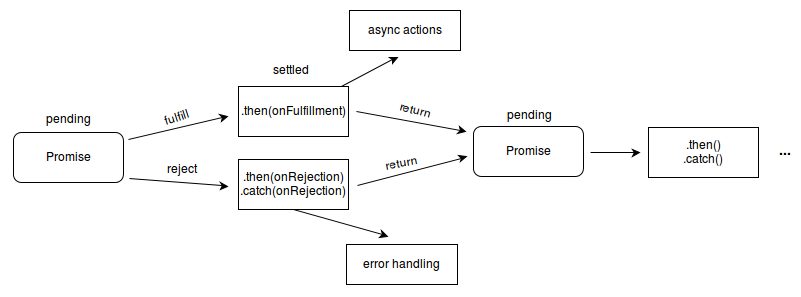
Promise flowchart
It is worth noting that
Promise supports chaining. It also supports passing values from the current state to the next state.Promise example
- Reading a file
// callback-type
function readJSON(filename, callback){
    fs.readFile(filename, 'utf8', function (err, res){
    	if (err) return callback(err);
    	callback(null, JSON.parse(res));
    });
}

readJSON('test.json', function (err, res) {
	if (err) {
    	// handle error
    }
    // handle json content
});

// promise-type
function readJSON(filename){
	return fs.readFileAsync(filename, 'utf8');
}

readJSON('test.json').then(function (res) {
	// handle json content
}).catch(function (err) {
	// handle error
});

// or this way
function readJSON(filename) {
	return new Promise(function (resolve, reject) {
    	fs.readFile(filename, 'utf8', function (err, res) {
        	if (err) {
            	reject(err);
            } else {
            	resolve(res);
            }
        });
    });
}

readJSON('test.json').then(function (res) {
	// handle file content
}, function (err) {
	// handle error
});
It should be noted that the first Promise example uses Bluebird's API, whose
fs.readFileAsync is a method that only exists after using Promise.promisifyAll . It is also a method that only Bluebird has, and it is equivalent tocatch is also a method that only Bluebird has, and it is equivalent to .then(null, function (err) {}) 。The second Promise example is the most basic: creating a Promise object, then defining
resolve and reject when they should be executed. In this example, since the created readJSON function returns a Promise object, so you can directly call .then() method.In Promise, the most commonly used one should be this
.then() .then The method accepts two parameters. The first parameter is the function executed after the previous stage succeeds, and the second parameter is the function executed after failure.then The anonymous function inside the method is executed only after the previous stage ends.In the first Promise example, since
fs use Promise.promisifyAll has been wrapped, so inside readJSON returning inside the function fs.readFileAsync actually also returns a Promise object. Therefore, you can also call it like in the second Promise example .then() method.- Read the database
// callback-type
Parse.User.logIn("user", "pass", {
  success: function(user) {
    query.find({
      success: function(results) {
        results[0].save({ key: value }, {
          success: function(result) {
            // the object was saved.
          }
        });
      }
    });
  }
});

// promies-type

Parse.User.logIn("user", "pass").then(function(user) {
  return query.find();
}).then(function(results) {
  return results[0].save({ key: value });
}).then(function(result) {
  // the object was saved.
});
This example is basically the same as the first example. The only difference is that this example assumes all methods return a Promise object. Therefore, you can perform
.then() 。Benefits of using Promise
Chained operations
Promise objects can all be chained. That is, after one
then continue calling after the method then , because then itself also returns a Promise object.doSomething().then(function () {
return a();
}).then(function () {
return b();
}).then(function () {
return c();
});The above code first executes
doSomething() execute after successful execution a() ,a() execute after successful execution b(),b() execute after success c . In this way, we can completely control the execution order of the code, regardless of doSomething()、 a()、 b()、 c() whether it is executed synchronously or asynchronously. We no longer need to worry about these things; we only focus on the final result. For JavaScript, or rather Node.js, this is a truly remarkable thing! You should know that achieving this effect with native JavaScript requires very redundant and troublesome code. But with Promise, it can be written very conveniently.In addition, between Promises
then values can be passed!getPromise().then(function () {
var greeting = 'hello';
console.log(greeting); // hello
return greeting + '!!!';
}).then(function (greeting) {
console.log(greeting); // hello!!!
});From the above code, it can be seen that in the first
then the value returned in the method will be captured in the subsequent then method. Using the method of creating Promise objects can also pass values to subsequent operations.var getPromise = function () {
return new Promise(function (resolve, reject) {
resolve('hello');
});
}
getPromise().then(function (greeting) {
console.log(greeting); // hello
});Reduce the amount of code
In the above Promise example, it should be quite obvious that code written with Promise has a slightly smaller total character count than code written with native JavaScript.
Although this may not be a particularly outstanding advantage, it can at least reduce the time we spend writing projects (because we can type fewer characters), as well as save storage space, etc.
Error handling
Another very useful and also very important thing is Promise error handling.
throw catch VS throw crash
If you have developed Node.js programs, you may have had this experience:
Once the program has any small error, such as a misspelled variable name, the program immediately crashes and exits. It gives no quarter. If this is in a local test environment, it is one thing, but if it is in a production environment, then the consequences are unimaginable. If the program frequently crashes and exits, wouldn't it need to be manually started all the time? Even if you use something like
supervisor monitoring services to monitor it, it still cannot be considered a reliable solution; at least it treats the symptoms but not the root cause.With Promises, you no longer have to worry about the program crashing and exiting automatically (in most cases it won't crash and exit automatically). When your program has an unhandled error, the Promise will throw a message in the console like this:
Possibly unhandled ReferenceError: aaaa is not defined
    at e:\project\index.js:62:17
    at tryCatch1 (e:\project\node_modules\bluebird\js\main\util.js:43:21)
...
Compared to the original program crashing and exiting immediately, this time the program only gives an error message and does not exit the process. Now you can sleep soundly, even if you deploy the program in a production environment.
No more if (err) {} else {}
From the previous Promise examples, you can see that without using Promises, you must pay attention to error handling at all times. Not only in the
readJSONfunction you need toif (err) {} else {}, and when calling it you also need to if (err) {} else {} once more. Now look at the second example; if Promises were not used, the complete code would look like this:Parse.User.logIn("user", "pass", {
success: function(user) {
query.find({
success: function(results) {
results[0].save({ key: value }, {
success: function(result) {
// the object was saved.
},
error: function(result, error) {
// An error occurred.
}
});
},
error: function(error) {
// An error occurred.
}
});
},
error: function(user, error) {
// An error occurred.
}
});The same code needs to be written repeatedly many times, which is a very painful thing. But this kind of thing happens very commonly in Node.js programs.
So, if you use Promises,Trust me, you'll fall in love with this way of writing!
If the above example were written using Promises, it would look like this:
Parse.User.logIn("user", "pass").then(function(user) {
  return query.find();
}).then(function(results) {
  return results[0].save({ key: value });
}).then(function(result) {
  // the object was saved.
}, function(error) {
  // there was some error.
});
See that? **Before using Promises, you had to write three error handlers, but after using Promises, you only need to write one error handler at the very end!** What a convenient approach!
This way, we no longer have to constantly pay attention to error handling; we only need to focus on our normal logic. Then we just write an error handler in the appropriate place. Sometimes there will be multiple error handlers. But this is a completely different concept from error handling before using Promises. Promises make error handling much easier and more convenient!
Let's look at a piece of code like this:
asyncThing1().then(function() {
  return asyncThing2();
}).then(function() {
  return asyncThing3();
}).catch(function(err) {
  return asyncRecovery1();
}).then(function() {
  return asyncThing4();
}, function(err) {
  return asyncRecovery2();
}).catch(function(err) {
  console.log("Don't worry about it");
}).then(function() {
  console.log("All done!");
});
You can try to think about what the entire flow of the above code is.
Of course, the result is as follows:
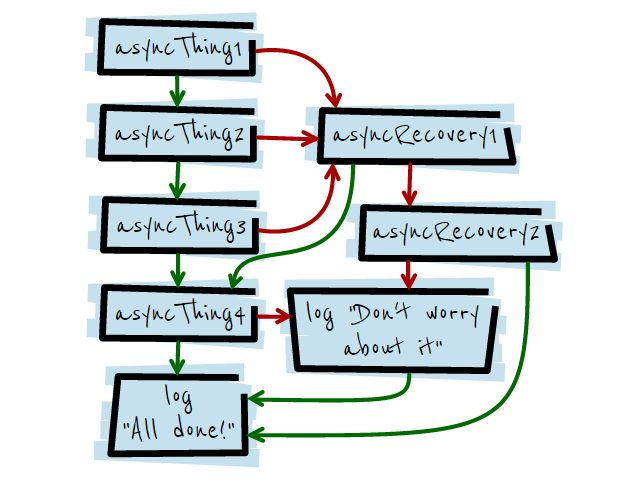
How about it, isn't it wonderful? If these still don't win you over, then please keep reading!
Asynchronous Queue Operations
Suppose I have a requirement like this: asynchronously, in the
/home create in the directory a, b, c, d these four folders, and they must be created in order. So, if you were to implement this using native Node.js, it would look something like this:fs.mkdir('/home/a', function (err) {
if (err) {
console.error(err);
} else {
fs.mkdir('/home/b', function (err) {
if (err) {
console.error(err);
} else {
fs.mkdir('/home/c', function (err) {
if (err) {
console.error(err);
} else {
// do something
}
});
}
});
}
});Perhaps you have other, better ways to implement it, but trust me, the fundamental principle remains the same. Moreover, this is a solution for the case where the number is fixed. What if the number of folders to be created is unknown? How should that be implemented?
Using native Node.js to implement these is somewhat cumbersome, and the methods aren't exactly flexible. So what would it look like if you used Promise?
Iteration + Promise = executing an asynchronous queue in parallel and in order
var list = ['a', 'b', 'c'];
list.reduce(function (p, folder) {
	return p.then(function () {
    	return new Promise(function (resolve, reject) {
        	fs.mkdir('/home/' + folder, function (err) {
            	if (err) {
                	reject(err);
                } else {
                	resolve();
                }
            });
        });
    });
}, Promise.resolve());
Done! If you still find it too cumbersome, then you can use Bluebird's
Promise.promisifyAll to achieve a more perfect operation:var Promise = require('bluebird'),
fs = Promise.promisifyAll(require('fs'));
var list = ['a', 'b', 'c'];
list.reduce(function (p, folder) {
return p.then(function () {
return fs.mkdirAsync('/home/' + folder);
});
}, Promise.resolve());Done! Comparing it with the original code, are you as surprised as I am at the power and convenience of Promise? Furthermore, this approach is also suitable for
list the case where the number is unknown.Let's take a look at how these codes work internally.
First, let's look at the
reduce introduction to the method:Syntax
arr.reduce(callback[, initialValue])Parameters
callbackFunction to execute on each value in the array, taking four arguments:previousValueThe value previously returned in the last invocation of the callback, or initialValue, if supplied. (See below.)currentValueThe current element being processed in the array.indexThe index of the current element being processed in the array.arrayThe array reduce was called upon.
initialValueOptional. Object to use as the first argument to the first call of the callback.
From this, it can be seen that in
list.reduce(function (p, folder) {

}, Promise.resolve());
, we use
Promise.resolve() as the initial value of the loop. And Promise.resolve() what is it?Promise.resolve returns a Promise object, and if you have passed a value to it, then it will also return it to the next then 。This is the first time we've seen Promise.resolve, which creates a promise that resolves to whatever value you give it. If you pass it an instance of Promise it'll simply return it (note: this is a change to the spec that some implementations don't yet follow). If you pass it something promise-like (has a 'then' method), it creates a genuine Promise that fulfills/rejects in the same way. If you pass in any other value, eg Promise.resolve('Hello'), it creates a promise that fulfills with that value. If you call it with no value, as above, it fulfills with "undefined".
Once you understand this, it's not hard to see why the inside of the loop starts with
return p.then(function () {

});
starts with. Next comes executing the task we need to perform.
return fs.mkdirAsync() , creates a folder, and returns a Promise object. At this point the first loop ends here. Entering the second loop. Since in reduce , the initial value is the value returned from the previous loop. Then, in the second loop,return p.then(function () {
});This piece of code means appending this after what was returned by the first loop
then content. Then return it to the third loop. Continuing this way is equivalent to chaining together all the return values of all the loops within the loop, and since they are all connected through then chained connections, each loop internally executes in the manner of a Promise. Thus it achieves executing a queue of asynchronous operations in a parallel, sequential manner.This is the essence of Promise! This method is very useful in Node.js projects, if you have similar requirements that need to be fulfilled.
Current support status of Promise
Promise is now already part of ECMAScript 6!
This is an experimental technology, part of the Harmony (ECMAScript 6) proposal.
Because this technology's specification has not stabilized, check the compatibility table for usage in various browsers. Also note that the syntax and behavior of an experimental technology is subject to change in future version of browsers as the spec changes.
-- MDN
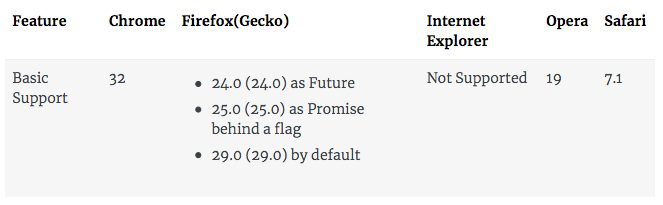
This means that perhaps in the near future, browsers will all natively support Promise! Currently,
Promise it has also existed in the form of various libraries for some time. These libraries include:- ...
The various libraries above all use the commonPromises/A+standard.
Of course, there is also the familiar jQuery. In jQuery there is an object called Deferred . However, jQuery's Deferred does not conform to the Promises/A+ standard. Those interested can look deeper into the differences between Deferred and the libraries given above.
Among all the libraries above, the most popular should be Q and Bluebird. I personally have only used Bluebird, and I personally find its API very flexible. It is worth a try.
Since there are so many Promise libraries, it is inevitable that such a question arises:
Which Promise library is really the best?
I did a Google search and found this great article: JavaScript Promises – A Comparison Of Libraries
While I'm at it, here are some comparison charts:
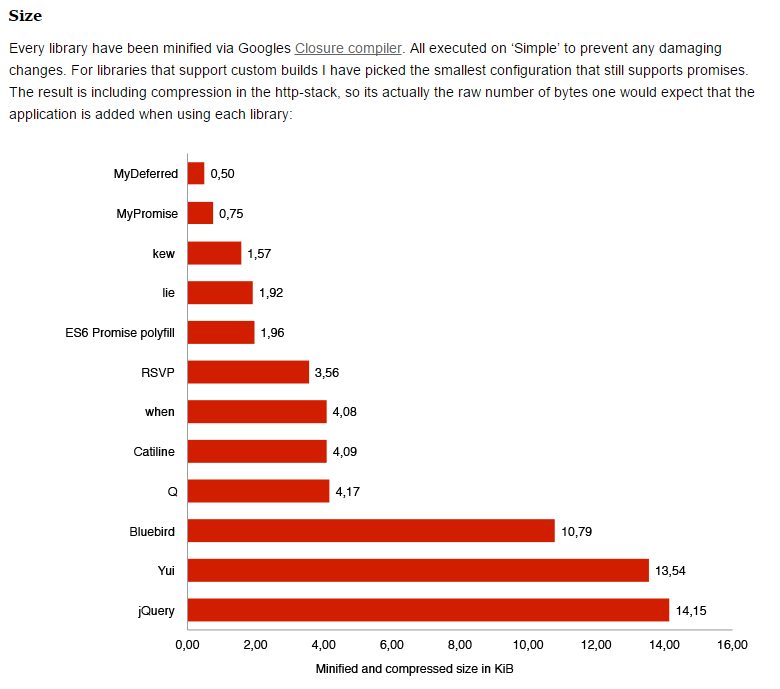
Comparison by compressed file size
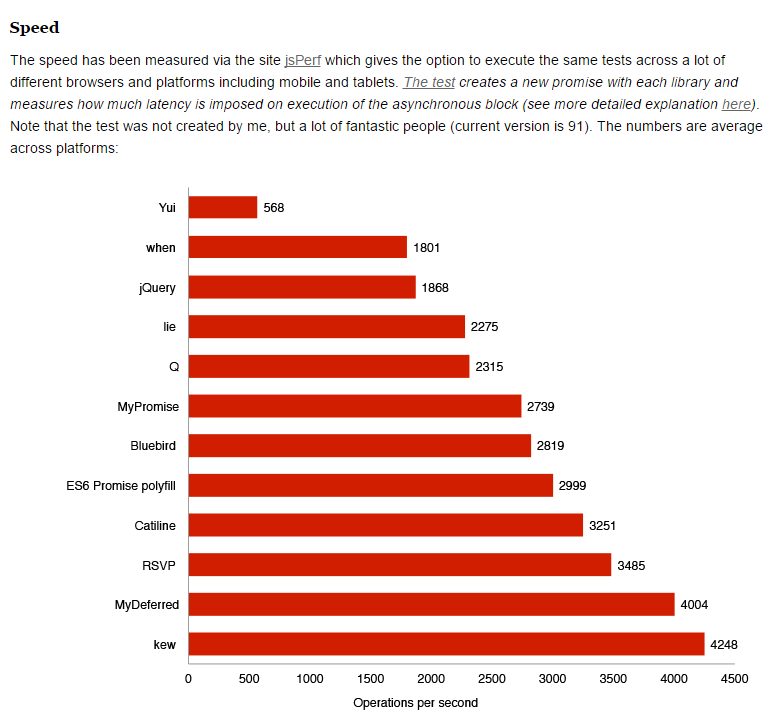
Comparison by speed
In addition, I also found another comparison chart written by a developer from abroad:
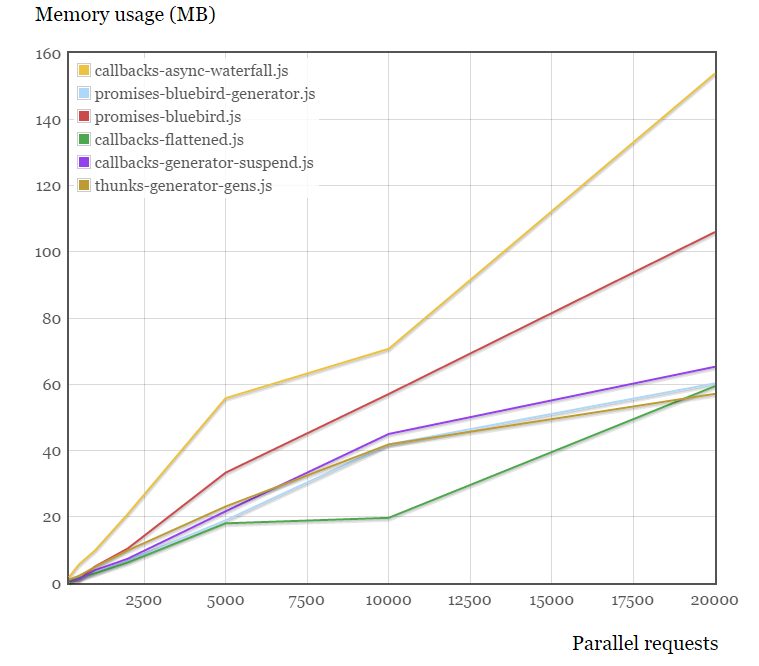
Comparison by memory usage
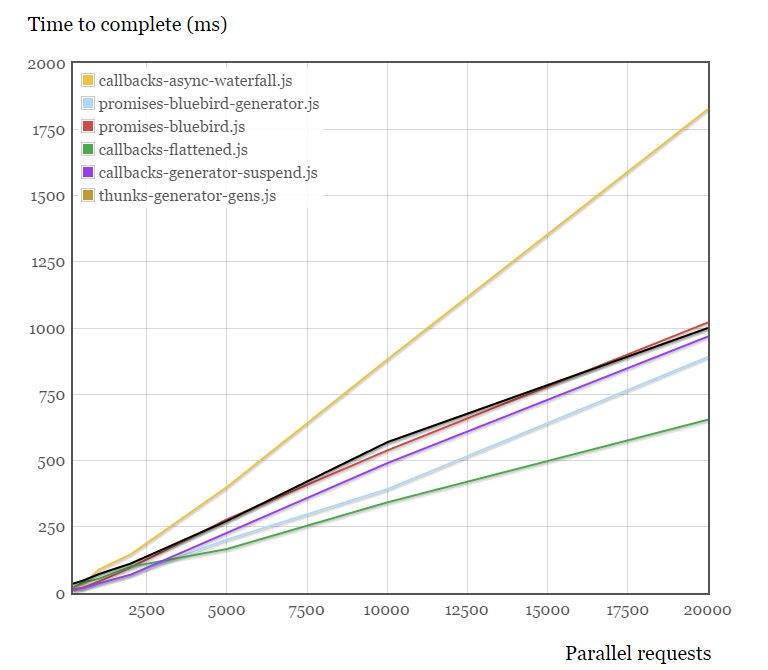
Comparison by completion time
Conclusion:
- If you care a lot about the size of the JS file, then Q or when is a good choice.
- If you don't care much about the size of the JS file, then Bluebird is a fairly ideal choice.
- If you care a lot about performance, then kew is worth having.
- If you're looking for a more limited solution that balances speed with a relatively small file size, then ES6 Promise polyfill is the most ideal choice.
Optimizing your Promise code
How to optimize your Promise code is a more advanced topic. I don't plan to write about the details here, because of space constraints, and this topic can't be covered in just a sentence or two.
Here I recommend reading the relevant content in the Bluebird Github Wiki:
Promise API reference
Unless otherwise noted, Chrome, Opera, and Firefox (nightly) all support all of the following methods. This polyfill implements the same interface in all browsers.
Static methods
Promise.resolve(promise);Returns a Promise (if and only ifpromise.constructor == Promise)Promise.resolve(thenable);Creates a new Promise from a thenable object. A thenable (Promise-like) object is an object with a "then" method.Promise.resolve(obj);Creates a Promise that is fulfilled with obj as its fulfillment value.Promise.reject(obj);Creates a Promise that is rejected with obj as its rejection reason. For consistency and ease of debugging (such as stack traces), obj should be an instance of Error.Promise.all(array);Creates a Promise that is fulfilled if and only if all Promises in the passed-in array are fulfilled; if any Promise in the array ends in rejection, the rejection reason is thrown. Each array element first goes through Promise.resolve, so the array may contain Promise-like objects or other objects. The fulfillment value is an array containing the fulfillment value of each Promise in the passed-in array (in order); the rejection reason is the first rejection reason encountered in the passed-in array.Promise.race(array);Creates a Promise that ends in fulfillment with the result of whichever object in the array is fulfilled first, or ends in rejection with the result of whichever object in the array is rejected first. Note: I'm not quite sure whether this interface is useful; I prefer an opposite method to Promise.all that only throws a rejection reason when all array elements have given rejection reasons.
Constructor
new Promise(function(resolve, reject) {});resolve(thenable)Your Promise will be fulfilled/rejected based on the result of this "thenable" object.resolve(obj)Your Promise will be fulfilled with obj as its fulfillment value.reject(obj)Your Promise will be fulfilled with obj as the rejection reason. For consistency and debugging (e.g., stack traces), obj should be an instance of an Error object. Errors thrown in the constructor's callback function are immediately passed to reject().
Instance methods
promise.then(onFulfilled, onRejected)onFulfilled is called when the promise is fulfilled. onRejected is called when the promise is rejected. Both parameters are optional; when either is undefined, the call skips to the next onFulfilled/onRejected in the then chain. Both callback functions accept only one argument: the fulfillment value or the rejection reason. After Promise.resolve is fulfilled, then returns a new Promise, which is equivalent to the value you return from onFulfilled/onRejected. If any error is thrown in the callback, the returned Promise will also be rejected with that error.promise.catch(onRejected)Syntactic sugar for promise.then(undefined, onRejected).
Reference
热门文章
-
Nine Years of Bookkeeping: Changes in Tools, Methods, and Mindset
-
Fast and Slow
-
Using PVE to Run a Clash Bypass Router Virtual Machine for Transparent Proxying
-
Page Load Performance Optimization Solutions
-
Prismira: Two and a Half Years of Iteration and Growth
-
Hand-sized Mini PC Yunxuan H170 Usage Experience and Homelab Setup