

State Management in Flutter
Redux originated in the front-end community, and its purpose is to solve state problems in complex front-end applications, but its design philosophy is not limited to the front end—it can even be used in Android and iOS development. redux.dart is a Redux implementation based on the Dart language, and with the Dart ecosystem, you can use it on the web or in Flutter. Mobx is also a data management library that originated in the front-end community; unlike Redux, it is reactive-based.
Redux
Redux was born in the front-end community, and its purpose is to solve state issues in complex front-end applications. However, its design philosophy is not limited to the front end; it can even be used in Android and iOS development. redux.dart is a Redux implementation based on the Dart language. With the Dart ecosystem, you can use it on the Web or in Flutter. The diagram above shows the Redux data flow process.
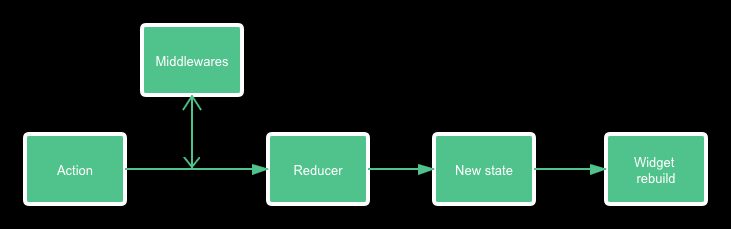
The diagram above shows the Redux data flow process.
Basic Usage
import 'package:redux/redux.dart';

// Create typed actions. You will dispatch these in order to
// update the state of your application.
enum Actions {
  increment,
  decrement,
}

// Create a Reducer. A reducer is a pure function that takes the
// current State (int) and the Action that was dispatched. It should
// combine the two into a new state without mutating the state passed
// in! After the state is updated, the store will emit the update to
// the `onChange` stream.
//
// Because reducers are pure functions, they should not perform any
// side-effects, such as making an HTTP request or logging messages
// to a console. For that, use Middleware.
int counterReducer(int state, action) {
  if (action == Actions.increment) {
    return state + 1;
  } else if (action == Actions.decrement) {
    return state - 1;
  }

  return state;
}

// A piece of middleware that will log all actions with a timestamp
// to your console!
//
// Note, this is just an example of how to write your own Middleware.
// See the redux_logging package on pub for a pre-built logging
// middleware.
loggingMiddleware(Store<int> store, action, NextDispatcher next) {
  print('${new DateTime.now()}: $action');

  next(action);
}

main() {
  // Create the store with our Reducer and Middleware
  final store = new Store<int>(
    counterReducer,
    initialState: 0,
    middleware: [loggingMiddleware],
  );

  // Render our State right away
  render(store.state);

  // Listen to store changes, and re-render when the state is updated
  store.onChange.listen(render);

  // Attach a click handler to a button. When clicked, the `INCREMENT` action
  // will be dispatched. It will then run through the reducer, updating the
  // state.
  //
  // After the state changes, the html will be re-rendered by our `onChange`
  // listener above.
  querySelector('#increment').onClick.listen((_) {
    store.dispatch(Actions.increment);
  });
}

render(int state) {
  querySelector('#value').innerHtml = '${state}';
}
Actions
- The only means of changing store data
- Through
store.dispatchexecuting
JS version Action:
{
  type: TOGGLE_TODO,
  index: 5
}
Dart version Action:
class AddTodoAction {
  final Todo todo;

  AddTodoAction(this.todo);
}
Reducers
- Handle the logic for changing store data
- Pure function, no side effects
Its main role is to generate a new state based on the incoming Action:
(previousState, action) => nextStateStore
- Store the application's state
- Usually a large object
- The state in the store is immutable; each action generates a new state
- The application triggers state changes by calling the store's dispatch
- The application calls
onChangeListen for data changes in the store
Middlewares
- Provide extensions that are triggered after an action is initiated and before the reducer executes
- Mostly used for logging, crash reporting, calling asynchronous APIs, etc.
Asynchronous actions
Many times you need to perform some asynchronous operations, such as API requests. Although this step can be handled in middleware, there are actually ready-made middleware solutions to help us handle asynchronous actions, for example redux_thunk :
import 'dart:async';

import 'package:redux/redux.dart';
import 'package:redux_thunk/redux_thunk.dart';

void main() {
  // First, create a quick reducer
  String reducer(String state, dynamic action) =>
      action is String ? action : state;

  // Next, apply the `thunkMiddleware` to the Store
  final store = Store<String>(
    reducer,
    middleware: [thunkMiddleware],
  );

  // Create a `ThunkAction`, which is any function that accepts the
  // Store as it's only argument. Our function (aka ThunkAction) will
  // simply send an action after 1 second.  This is just an example,
  // but  in real life, you could make a call to an HTTP service or
  // database instead!
  void action(Store<String> store) async {
    final String searchResults = await Future.delayed(
      Duration(seconds: 1),
      () => "Search Results",
    );

    store.dispatch(searchResults);
  }

  // Dispatch the action! The `thunkMiddleware` will intercept and invoke
  // the action function.
  store.dispatch(action);
}
Instead of dispatching a regular class action, by using the thunk middleware, you can also dispatch an asynchronous function. This function receives the store as a parameter, and then you can make asynchronous calls inside the function and trigger other actions as needed.
The implementation principle of redux thunk is very simple. It essentially determines whether the incoming action is a ThunkAction. If so, it calls it; otherwise, it calls
next method to proceed to the next middleware.dynamic thunkMiddleware<State>(
Store<State> store,
dynamic action,
NextDispatcher next,
) {
if (action is ThunkAction<State>) {
return action(store);
} else if (action is CallableThunkAction<State>) {
return action.call(store);
} else {
return next(action);
}
}The benefit of using redux thunk is that it makes actions more flexible. Developers can handle asynchronous operations within actions without separately creating middleware to achieve the same thing, making the code more centralized and concise.
Flutter redux
Redux is essentially a data management library, and it is unrelated to the View layer. If you want to use redux in Flutter, you need a bridge to connect Flutter and redux, and this bridge is flutter_redux.
Flutter redux provides three components:
StoreProvider
StoreProvider is the basic component of flutter redux. Here you pass the store to it, and then in its child components you can access the store data.StoreProvider is essentially a InheritedWidget component, which provides StoreProvider.of method to quickly obtain store data, provided that you must be inside a child component of StoreProvider:import 'package:flutter/material.dart';
import 'package:flutter_redux/flutter_redux.dart';
import 'package:redux/redux.dart';
enum Actions { Increment }
int counterReducer(int state, dynamic action) {
if (action == Actions.Increment) {
return state + 1;
}
return state;
}
void main() {
final store = Store<int>(counterReducer, initialState: 0);
runApp(FlutterReduxApp(
title: 'Flutter Redux Demo',
store: store,
));
}
class FlutterReduxApp extends StatelessWidget {
final Store<int> store;
final String title;
FlutterReduxApp({Key key, this.store, this.title}) : super(key: key);
@override
Widget build(BuildContext context) {
return StoreProvider<int>(
store: store,
child: MaterialApp(
theme: ThemeData.dark(),
title: title,
home: Scaffold(
appBar: AppBar(
title: Text(title),
),
body: Center(
child: Column(
mainAxisAlignment: MainAxisAlignment.center,
children: [
Text(
'You have pushed the button this many times:',
),
StoreConnector<int, String>(
converter: (store) => store.state.toString(),
builder: (context, count) {
return Text(
count,
style: Theme.of(context).textTheme.display1,
);
},
)
],
),
),
floatingActionButton: Child(),
),
),
);
}
}
class Child extends StatefulWidget {
@override
State<StatefulWidget> createState() {
return ChildState();
}
}
class ChildState extends State {
void onPressed() {
var store = StoreProvider.of<int>(context);
store.dispatch(Actions.Increment);
}
@override
Widget build(BuildContext context) {
return FloatingActionButton(
onPressed: onPressed,
child: Icon(Icons.add),
);
}
}StoreConnector
StoreConnector provides a quick way to obtain store data. You can transform the store's state according to the converter method, thereby obtaining a state suitable for use by the component.
StoreConnector<AppState, List<Todo>>(
  converter: (store) => store.state.todos,
  builder: (_, todos) {
    return new Text(
      'Todo count: ${todos.length}',
      textAlign: TextAlign.center,
      style: const TextStyle(fontSize: 20.0),
    );
  },
),
It should be noted that, by default, StoreConnector will rebuild every time the store's state changes. Even if the state you obtain through the converter has not changed. If you want to reduce rebuilds as much as possible, you can pass to StoreConnector
distinct: true the parameter:StoreConnector<AppState, List<Todo>>(
converter: (store) => store.state.todos,
distinct: true,
builder: (_, todos) {
return new Text(
'Todo count: ${todos.length}',
textAlign: TextAlign.center,
style: const TextStyle(fontSize: 20.0),
);
},
),In this way, the builder method will only re-execute after the data returned by the converter changes. At the same time, if your converter returns a class, then you need to write the class's
== and hashCode , so that this feature can take effect.StoreBuilder
StoreBuilder is essentially a wrapper based on StoreConnector. The difference between the two is that StoreConnector can obtain the required data structure by passing in a ViewModel, while StoreBuilder simply and crudely passes the entire store to the builder. In general, StoreConnector is recommended.
Mobx
Like redux, Mobx is another data management library born in the frontend community, but unlike redux, it is reactive-based.
Basic usage
import 'package:flutter/material.dart';
import 'package:mobx/mobx.dart';

part 'counter.g.dart';

class Counter = CounterBase with _$Counter;

abstract class CounterBase with Store {
  @observable
  int value = 0;

  @action
  void increment() {
    value++;
  }
}

final counter = Counter();

final dispose = autorun((_) {
  print(counter.value);
});

counter.value = 2;
counter.increment();

dispose();

// Prints:
// 0
// 2
// 3
Observables
Observables are reactive state; they can be simple numbers or strings, or complex objects. You can use
Observable to create the most basic reactive state:import 'package:mobx/mobx.dart';
final counter = Observable(0);You can also use mobx_codegen to declare a class property as observable with an annotation:
import 'package:mobx/mobx.dart';

part 'counter.g.dart';

class Counter = CounterBase with _$Counter;

abstract class CounterBase with Store {
  @observable
  int value = 0;

  @computed
  int get doubleValue => value * 2;
}
Actions
Unlike Redux actions, MobX actions are used to change observable state.
final counter = Observable(0);

final increment = Action((){
  counter.value++;
});
import 'package:mobx/mobx.dart';
part 'counter.g.dart';
class Counter = CounterBase with _$Counter;
abstract class CounterBase with Store {
@observable
int value = 0;
@action
void increment() {
value++;
}
@action
Future<void> asyncAction() async {
value = 5;
await sleep();
value = 10; //This also notifies observers
}
}Reactions
Reactions are used to listen for changes to observables. MobX provides several methods to listen to observables:
- autorun
- reaction
- when
- asyncWhen
Flutter MobX
Similar to flutter_redux, flutter_mobx provides a bridge between Flutter and MobX. It provides an Observer widget to listen to observable objects:
import 'package:flutter/material.dart';
import 'package:flutter_mobx/flutter_mobx.dart';
import 'package:mobx/mobx.dart';

part 'counter.g.dart';

class Counter = CounterBase with _$Counter;

abstract class CounterBase with Store {
  @observable
  int value = 0;

  @action
  void increment() {
    value++;
  }
}

class CounterExample extends StatefulWidget {
  const CounterExample({Key key}) : super(key: key);

  @override
  _CounterExampleState createState() => _CounterExampleState();
}

class _CounterExampleState extends State<CounterExample> {
  final _counter = Counter();

  @override
  Widget build(BuildContext context) => Scaffold(
        appBar: AppBar(
          title: const Text('Counter'),
        ),
        body: Center(
          child: Column(
            mainAxisAlignment: MainAxisAlignment.center,
            children: <Widget>[
              const Text(
                'You have pushed the button this many times:',
              ),
              Observer(
                  builder: (_) => Text(
                        '${_counter.value}',
                        style: const TextStyle(fontSize: 20),
                      )),
            ],
          ),
        ),
        floatingActionButton: FloatingActionButton(
          onPressed: _counter.increment,
          tooltip: 'Increment',
          child: const Icon(Icons.add),
        ),
      );
}
Whenever an observable object changes, the Observer triggers a rebuild.
Differences from Redux
- Store data typesRedux state data is a plain object, whereas MobX data is of observable type.
- State mutabilityRedux state is immutable, and a new state is generated each time. In contrast, MobX state is mutable, and actions can directly modify the state data.
- Learning curveMobx is easier to get started with, and its learning curve is relatively gentle. Redux, on the other hand, is based on functional programming concepts, so it has a higher barrier to entry. In addition, Mobx code is more concise, whereas Redux requires creating a lot of boilerplate code.
- MaintainabilityRelatively speaking, Redux is more maintainable.
热门文章
-
Nine Years of Bookkeeping: Changes in Tools, Methods, and Mindset
-
Fast and Slow
-
Using PVE to Run a Clash Bypass Router Virtual Machine for Transparent Proxying
-
Page Load Performance Optimization Solutions
-
Prismira: Two and a Half Years of Iteration and Growth
-
Hand-sized Mini PC Yunxuan H170 Usage Experience and Homelab Setup