

Preload & Prefetch & Preconnect
Preload & Prefetch & Preconnect
Preload
preload API interface:
<link rel="preload" as="fetch" href="http://example.com/api/v2/list" crossorigin="anonymous" />Requirements:
- The `as` value is `fetch`
- Cross-origin requests need to include crossorigin
To hit the preload data, the following must be satisfied:
- The API request method, URL, and request headers must be identical
Note that manually setting request headers will prevent the response from being obtained from preload:
This requires that APIs using preload must not add extra request headers; otherwise, content will not be retrieved from preload.
Additionally, for cross-origin API preload, when using fetch requests, sometimes you need to add
{ credentials: 'same-origin' } the parameter.Additionally, the response content after preload will only be consumed once; after it is consumed, requesting the resource again will issue a new request.
Additionally, on the UC International browser, preload does not support
as="fetch" 😓Prefetch
If the resource's cache-control is set to no-store, then prefetch will become invalid.
Preconnect
Chrome can only initiate 6 DNS queries at the same time (if the new async DNS resolver is used, the number is not 6, but there is still a certain limit on the quantity), so the number of preconnect or dns-preconnect entries in HTML should preferably not exceed 6.
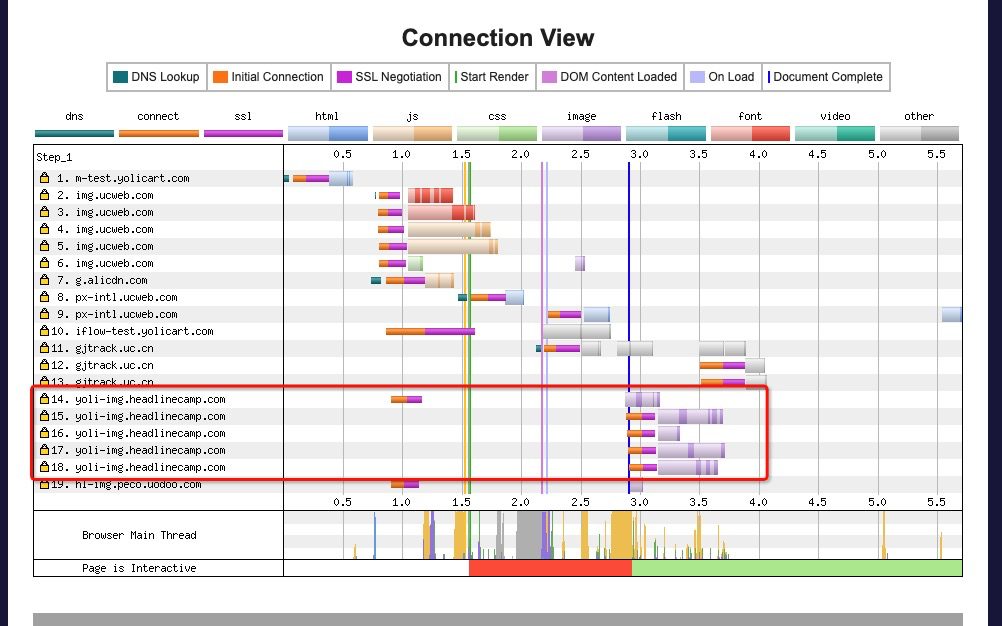
For non-http2 resources, using preconnect does not preconnect all resources under that domain. The circled part in the image above is an http 1.1 connection.
热门文章
-
Nine Years of Bookkeeping: Changes in Tools, Methods, and Mindset
-
Fast and Slow
-
Using PVE to Run a Clash Bypass Router Virtual Machine for Transparent Proxying
-
Page Load Performance Optimization Solutions
-
Prismira: Two and a Half Years of Iteration and Growth
-
Hand-sized Mini PC Yunxuan H170 Usage Experience and Homelab Setup