

Preload: What Is It Good For?
Preload is a newly introduced web standard whose main purpose is to optimize Web performance and give Web developers more powerful control over network loading. It provides Web developers with the ability to customize the resource loading logic of a page, making it possible to avoid performance problems similar to those encountered by script resource loaders.
Original link:https://www.smashingmagazine.com/2016/02/preload-what-is-it-good-for/
Author: Yoav Weiss
Preload is a newly introduced web standard, whose main purpose is to optimize Web performance, and to give Web developers more powerful control over network loading. It provides Web developers withthe ability to customize page resource loading logic, so that they can avoid suffering from performance issues similar to those encountered with script resource loaders.
A few weeks ago, Ireleasedsupport for the Preload feature on Chrome Canary. If no unexpected bugs appear, it will be released in Chrome stable in mid-April. Before that, you may ask, what is this preload? What can it do? And how can it help you?
In fact,
<link rel="preload"> is an explicit resource loading directive.In plain terms, it can tell the browser to load a specific resource, because we, as the page author (or the server administrator, or the server-side developer), know that the browser will need to use that resource very soon.
Don't we already have this capability?
Sort of, but not entirely.
<link rel="prefetch"> has been used on the Web for a long time, andbrowser support is quite good. More importantly, we have supported it in Chrome <link rel="subresource"> for some time now. So what's new about this preload? How is it different from the previous two directives? After all, they all tell the browser to load resources, right?Yes, that's right, but there is a very important difference between them. The difference is that this new directive solves many scenarios that the old directives did not solve.
<link rel="prefetch"> This directive is used to tell the browser toload resources that may be used in the next page visitThis almost means that this resource will be loaded at an extremely low priority (after all, the resources the browser knows about are all needed by the current page, and will be more important than the resources we guess it might use on the next visit). This means that the main use of prefetch is to speed up the next page visit, not the current page visit.<link rel="subresource"> The original plan was to solve the resource loading problem for the current page visit, but in certain specific scenarios it did not do this well. Because developers do not have the ability to define the priority of each resource, the browser (only Chrome and Chromium-based browsers, actually) downloads it at a very low priority, which means that most of the time, when the actual request for the resource is truly triggered at some point, the subresource has not been downloaded at all.So how does Preload do better?
Like subresource, Preload is destined to serve the current page visit, but it has a very small yet very important difference from subresource, namely that it has a
as attribute, and it can do a series of things that neither subresource nor prefetch can do:- The browser can set the correct priority for the resource, so that it is loaded accordingly, and it will not block the loading of other important resources, or resources that are less important further down the tag.
- The browser can ensure that the request is subject to the correct Content-Security-Policy the constraints of the directive; if it should not be issued, the request will not reach the server.
- The browser can send appropriate
Acceptrequest headers based on the resource type (for example, when loading an image resource, indicating that the browser supports the "image/webp" format) - The browser knows the type of the resource, so when the same resource is requested subsequently, it can determine whether the current resource can be reused.
What makes Preload different from the previous two is that it has
onload event (at least in Chrome, the other two rel types of resource loading do not have this event).Most importantly, Preload does not block the page's onload event, unless the current resource is referenced by a resource that blocks this event.
Combining these characteristics, Preload grants us many capabilities that we previously could not achieve.
Let's take a look at these new capabilities together!
Loading Late-Discovered Resources
The most basic use of Preload is topreload resources on the page that are discovered late. Although most resources that exist in the form of HTML tags can be discovered by the browser's preloader at a very early stage, not all resources exist in the form of tags. Some resources are hidden inside CSS files and JS files, so the browser can only know that these resources need to be loaded at a fairly late stage. Therefore, most of the time, these resources cause delays in first render, text rendering, or the loading of important parts of the page.
Now you have a way to tell the browser, "Hey, browser! Here is a resource you will use later, so start loading it now."
Expressed in code, this method would look like this:
<link rel="preload" href="late_discovered_thing.js" as="script" >This as attribute tells the browser what type of file it will download. The value of the as attribute can be one of the following:
"script""style""image""media"- and
"document"
(the complete list can be found in the fetch specificationfor reference)
If you omit
as the attribute, or assign an invalid value, then it will be equivalent to an XHR request, because the browser does not know what resource it is loading, and it will load it at a very low priority.Preloading Font Files
A common manifestation of the "late-discovered critical resource" pattern is web fonts. On the one hand, most of the time it is very critical for text rendering on the page (unless you are using the brand-new font-display CSS property value). On the other hand, it is buried deep within CSS files, and even if the browser's preloader parses the CSS file, it cannot determine whether these font files are actually needed unless the browser also knows that the CSS rule selectors depending on these fonts are indeed applied to certain DOM nodes. In theory, the browser could know this, but no browser does so, and even if a browser did, it would cause meaningless downloads if the font rules were overridden by later rules.
Simply put, it's complicated.
However, you canby adding a preload directive for the fonts you needto bypass these hassles. Something like this:
<link rel="preload" href="font.woff2" as="font" type="font/woff2" crossorigin>One thing to point out: when loading fontsyou need to add a
crossorigin attribute, because they areloaded using anonymous-mode CORS. Yes, even if your font files are same-origin with your page. Sorry.Also, this
type attribute is used to ensure that this resource is only preloaded on browsers that support this file type. As of now, only Chrome supports preload (translator's note: the original was written in 2016), and it also supports the WOFF2 format, but in the future more browsers will support preload; however, we cannot assume they will all support WOFF2. The same applies to other resources you want to preload—the level of browser support is not consistent.Dynamic loading, but not executing
Another very interesting scenario is now possible, namelywhen you want to download a resource because you know you need it, but you don't want to execute it immediately. For example, imagine a scenario where you want to execute a certain script at some point during the page's lifecycle, but you don't have control over the script's content (and therefore cannot add something like
runNow() function).Currently, there are very limited ways to achieve this goal. If you simply dynamically inject the script when you want to execute it, the browser needs to download it before executing the script, which means this operation may take some time. You can also download the script in advance via XHR, but the browser will refuse to reuse it, because the file type when you request this resource again is different from what you downloaded before.
So what can we do?
Before preload, there was basically no good way. (In some cases you can use
eval() to execute the script content, but this approach is not always feasible and has side effects.) Fortunately, using preload can achieve this.var preload = document.createElement('link');
link.href = 'myscript.js';
link.rel = 'preload';
link.as = 'script';
document.head.appendChild(link);You can execute this script during the page loading process, much earlier than when you want to execute it (but only if you are quite sure that loading this script will not affect the loading of other more important resources). Then, when you need to run this script, you simply insert a
script tag and that's it.var script = document.createElement('script');
script.src = 'myscript.js';
document.body.appendChild(script);Tag-based asynchronous loading
Another cool hack is to use
onload event callbacks to implement a tag-based asynchronous loader. Scott Jehl isthe first to try this methodin his loadCSS library. Simply put, you can write code like this:<link rel="preload" as="style" href="async_style.css" onload="this.rel = 'stylesheet'">This way you can achieve tag-based asynchronous loading of styles! Scott also wrote a great demo to demonstrate this feature.
This feature can also be used for asynchronous loading of scripts.
What? You say we already have
<script async> ? Actually,<script async> is great, but it blocks the window's onload event. In some scenarios, this may be the result you expect, but in other scenarios you may not want this.Suppose you want to download an analytics script. You want to download this script as quickly as possible (to minimize the number of users who aren't counted because the script hasn't finished loading), but you don't want it to cause a decline in user experience metrics—in particular, you don't want it to block the page's onload. (Youcan say that onload isn't the only metric that affects users, which is true, but if it can make the spinning loading icon disappear faster, that's still a great approach.)
With preload, achieving this goal is simple:
<link rel="preload" as="script" href="async_script.js"
onload="var script = document.createElement('script');
        script.src = this.href;
        document.body.appendChild(script);">
(In the
onload attribute, embedding a very long JS function is probably not a good idea, so you may need to define that part of the code as an inline function.)Responsive loading
Since preload is essentially a link tag, according to the link standard it has a
media attribute. (This feature is currently not supported in Chrome, but it will be soon.) This attribute enables conditional loading of resources.What's the benefit of doing this? Let's suppose your site's initial view has a very large interactive map on desktop/wide-screen devices, but you only want to display a static map on mobile/narrow-screen devices.
If you're smart enough, you'll thinkonly load the resource you need, rather than loading two copies. To achieve this, you can only load it dynamically via JS. But doing so makes these resources invisible to the preloader, and they may load later, which affects the user's visual experience and your SpeedIndex score has anegative impact。
How can we make the browser aware of these resources as early as possible?
You guessed it! Preload.
We canuse Preload to load them in advance, and we can take advantage of its media attribute, so that only the scripts that are needed will be preloaded.
<link rel="preload" as="image" href="map.png" media="(max-width: 600px)" >
<link rel="preload" as="script" href="map.js" media="(min-width: 601px)" >
HTTP response headers
Another feature that link tags bring is that they can be presented in the form of HTTP response headers. This means that for most of the examples I showed above, you canuse an HTTP response header to achieve the same functionality. (The only exception is
onload the related examples. You cannot define for an HTTP response header onload the event's callback function.)An example of this kind of HTTP response header looks like this:
Link: <thing_to_load.js>; rel="preload"; as="script"
Link: <thing_to_load.woff2>; rel="preload"; as="font"; crossorigin
When the person responsible for performance optimization and the person responsible for handling HTML tags are not the same person, HTTP response headers become very useful. A very important example isexternal optimization enginesthat scan content and optimize it (I have worked on something similar)。
Other examples can include an independent performance optimization team that wants to add this kind of optimization, or optimizing the build process to reduce operations on HTML content, thereby significantly reducing complexity.
Capability detection
One last point: for some of the examples above, such as loading scripts or style files, we rely on the fact that the preload feature is supported by the browser. What if the browser does not support this feature?
Everything stops working!
We don't want that. So as part of preload, we also modified the DOM standard, so that for the supported
rel keyword, capability detection becomes possible.Anexample function for capability detectioncan look like this:
var DOMTokenListSupports = function(tokenList, token) {
  if (!tokenList || !tokenList.supports) {
    return;
  }
  try {
    return tokenList.supports(token);
  } catch (e) {
    if (e instanceof TypeError) {
      console.log("The DOMTokenList doesn't have a supported tokens list");
    } else {
      console.error("That shouldn't have happened");
    }
  }
};

var linkSupportsPreload = DOMTokenListSupports(document.createElement("link").relList, "preload");
if (!linkSupportsPreload) {
  // Dynamically load the things that relied on preload.
}
If the browser not supporting preload would break your site, thisprovides a fallback loading mechanism, which is really convenient!
Can't HTTP/2 Push handle the use cases above?
Not entirely. Although they overlap in some functionality, for the most part they are complementary.
One advantage of HTTP/2 Push is that it canproactively push resources for which the browser has not yet sent a request. This means Push can even push some resources to the browser before the HTML is sent to the browser. It can also be used to push resources over an already established HTTP/2 connection, without relying on a response that can attach an HTTP Link response header.
On the other hand,preload can be used to address scenarios that HTTP/2 cannot solve. As we have seen, with preload the program knows that a resource is loading, and it can receive a notification once the resource has finished loading. This is not something HTTP/2 can do. Moreover, HTTP/2 Push cannot be used for third-party resources, but preload can load third-party resources just as conveniently as first-party resources.
In addition, HTTP/2 Push cannot take into account the browser's cache or the state of non-global cookies. Although the cache state can also be handled through the newCache Digest standardto solve it, for non-global cookies it has little room to maneuver, so Push is not suitable for resources that depend on such cookies. For such resources, preload is your best friend.
Another benefit of Preload is that it can perform content negotiation, whereas HTTP/2 Push cannot. This means that if you want to use Client-Hints to determine the correct image to send to the browser, or to use
Accept: request headers to find the best format, then HTTP/2 Push cannot help you.So...
I hope you are now convinced that Preload opens up a new set of loading capabilities that were not possible before, and that you are excited to use it.
What I want you to do is open your Chrome Canary, start tinkering with Preload, study it carefully, and then complain to me. This is a new feature, and like any new feature, it may have flaws. Please help me find them and fix them as early as possible.
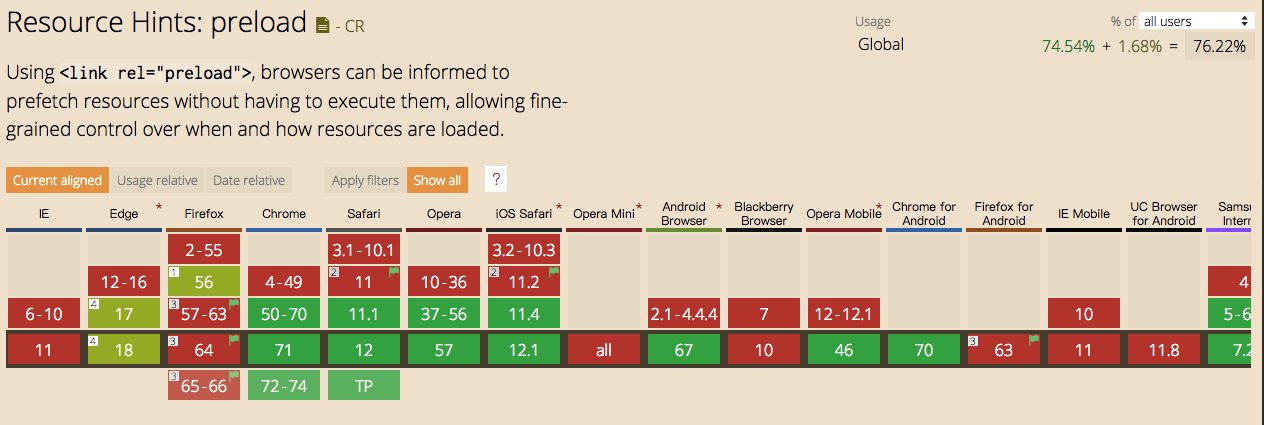
Translator's note: As of 2019/01/08, Preload's compatibility is as shown in the figure below:
Copy of Preload: What Is It Good For?
Original link:https://www.smashingmagazine.com/2016/02/preload-what-is-it-good-for/
Author: Yoav Weiss
Preload is a newly introduced web standard, whose main purpose is to optimize Web performance, and to give Web developers more powerful control over network loading. It provides Web developers withcustom page resource loading logiccapabilities, making it possible to avoid performance problems similar to those encountered by script resource loaders.
A few weeks ago, on Chrome Canaryreleasedsupport for the Preload feature. If no unexpected bugs appear, it will be released in Chrome stable in mid-April. Before that, you may ask, what is this preload? What can it do? And how can it help you?
In fact,
<link rel="preload"> is an explicit resource loading directive.In plain terms, it can tell the browser to load a specific resource, because we, as page authors (or server administrators, or server-side developers), know that the browser will need to use that resource very soon.
Don't we already have this capability?
Sort of, but not entirely.
<link rel="prefetch"> has been used on the Web for a long time, andbrowser support is quite good. More importantly, we've supported it on Chrome <link rel="subresource"> for a while now. So what's new about this preload? How is it different from the previous two directives? After all, they all tell the browser to load resources, right?Yes, that's right, but there's a very important difference between them. The difference is that this new directive solves many scenarios that the old directives didn't.
<link rel="prefetch"> This directive is used to tell the browser toload resources that might be used in the next page visit. This almost means that the resource will be loaded at an extremely low priority (after all, the resources the browser knows about are all needed by the current page, and will be more important than the resources we guess it might use next time). This means that the main purpose of prefetch is to speed up the next page visit, not the current page visit.<link rel="subresource"> The original plan was to solve the resource loading problem for the current page visit, but it didn't do that very well in certain specific scenarios. Because developers don't have the ability to define the priority of each resource, the browser (only Chrome and Chromium-based browsers, actually) downloads it at a very low priority, which means that most of the time, when the actual request for the resource is really triggered at some point, the subresource hasn't been downloaded at all.So how does Preload do it better?
Like subresource, Preload is destined to serve the current page visit, but it has a very small yet very important difference from subresource, which is that it has an
as attribute, and it can do a series of things that neither subresource nor prefetch can do:- The browser can set the correct priority for the resource, so that it is loaded accordingly and doesn't block the loading of other important resources, or resources that aren't as important later in the tag.
- The browser can ensure that the request is subject to the correct Content-Security-Policy directive constraints, and if it should not be issued, the request will not reach the server.
- The browser can send appropriate
Acceptrequest headers based on the resource type (for example, when loading an image resource, indicating that the browser supports the "image/webp" format) - The browser knows the type of the resource, so when the same resource is subsequently requested, it can determine whether the current resource can be reused.
What makes Preload different from the previous two is that it has
onload event (at least in Chrome, the other two rel types of resource loading do not have this event).Most importantly, Preload does not block the page's onload event, unless the current resource is referenced by a resource that blocks this event.
Combining the above characteristics, Preload gives us many capabilities that we could not achieve before.
Let's take a look at these new capabilities together!
Loading Late-Discovered Resources
The most basic use of Preload is topreload resources on the page that are discovered late. Although most resources that exist in the form of HTML tags can be discovered very early by the browser's preloader discovery, not all resources exist in the form of tags. Some resources are hidden inside CSS files and JS files, so the browser can only know that these resources need to be loaded at a fairly late point in time. Therefore, most of the time, these resources cause delays in first render, text rendering, or the loading of important parts of the page.
Now you have a way to tell the browser, "Hey, browser! Here is a resource you will use later, so start loading it now."
Expressed in code, this method would look like this:
<link rel="preload" href="late_discovered_thing.js" as="script" >This as attribute tells the browser what type of file it will download. The value of the as attribute can be one of the following:
"script""style""image""media"- and
"document"
(The complete list can be found in the fetch specificationfor reference.)
If you omit
as attribute, or assign an invalid value, then it will be equivalent to an XHR request, because the browser doesn't know what resource it is loading, and it will load it at a very low priority.Early loading of font files
A common manifestation of the "late-discovered critical resource" pattern is web fonts. On the one hand, most of the time it is very critical for text rendering on the page (unless you are using the brand-new font-display CSS property value). On the other hand, it is deeply buried in CSS files, and even if the browser's preloader parses the CSS file, it cannot determine whether these font files are actually needed, unless the browser also knows that the CSS rule selectors that depend on these fonts are indeed applied to certain DOM nodes. In theory, the browser could know this, but no browser does so, and even if a browser did so, it would cause meaningless downloads if the font rules were overridden by later rules.
Simply put, it's complicated.
However, you canby adding a preload directive for the fonts you needto bypass these hassles. Something like this:
<link rel="preload" href="font.woff2" as="font" type="font/woff2" crossorigin>One thing to point out: when loading fontsyou need to add a
crossorigin attribute, because they areloaded using anonymous-mode CORS. Yes, even if your font files are same-origin with your page. Sorry.Also, this
type attribute is used to ensure that this resource will only be preloaded on browsers that support this file type. As of now, only Chrome supports preload (translator's note: the original text was written in 2016), and it also supports the WOFF2 format, but in the future more browsers will support preload, though we cannot assume they will all support WOFF2. The same applies to other resources you want to preload—the level of support varies across browsers.Dynamic loading, but not executing
Another very interesting scenario now becomes possible, which iswhen you want to download a resource because you know you need it, but you don't want to execute it immediately. For example, imagine a scenario where you want to execute a certain script at some point during the page's lifecycle, but you don't have control over the script's content (and therefore can't add something like
runNow() function to it).Currently, the methods available to achieve this are very limited. If you simply dynamically inject the script when you want to execute it, the browser needs to download it before executing it, which means this operation may take some time. You could also download the script in advance via XHR, but the browser will refuse to reuse it, because the file type when you request this resource again differs from what you previously downloaded.
So what can we do?
Before preload, there was basically no good way. (In some cases you could use
eval() to execute the script content, but this approach isn't always viable and has side effects.) Fortunately, using preload can accomplish this.var preload = document.createElement('link');
link.href = 'myscript.js';
link.rel = 'preload';
link.as = 'script';
document.head.appendChild(link);You can execute this script during the page load process, much earlier than the point at which you want to execute it (but only if you're fairly confident that loading this script won't affect the loading of other, more important resources). Then, when you need to run this script, you simply insert a
script tag and you're done.var script = document.createElement('script');
script.src = 'myscript.js';
document.body.appendChild(script);Tag-based asynchronous loading
Another very cool hack is to use
onload event callbacks to implement a tag-based asynchronous loader. Scott Jehl isthe first to try this methodin his loadCSS library. Simply put, you can write code like this:<link rel="preload" as="style" href="async_style.css" onload="this.rel = 'stylesheet'">This way, you can achieve tag-based asynchronous loading of styles! Scott also wrote a great demo to demonstrate this feature.
This feature can also be used for asynchronous loading of scripts.
What? You say we already have
<script async> ? Actually,<script async> is great, but it blocks the window's onload event. In some scenarios, this may be the result you want, but in other scenarios you may not want this.Suppose you want to download an analytics script. You want to download this script as quickly as possible (to minimize the number of users who cannot be tracked because the script hasn't finished loading), but you don't want it to cause a decline in user experience-related metrics, especially you don't want it to block the page's onload. (Youcan say that onload is not the only metric that affects users, which is true, but if it can make the spinning loading icon disappear faster, this is still a great approach).
With preload, achieving this goal is very simple:
<link rel="preload" as="script" href="async_script.js"
onload="var script = document.createElement('script');
        script.src = this.href;
        document.body.appendChild(script);">
(In
onload attribute is probably not a good idea, so you may need to define that part of the code as an inline function.)Responsive loading
Since preload is essentially a link tag, according to the link standard it has a
media attribute. (Currently this feature is not supported in Chrome, but it will be supported soon.) This attribute can achieve conditional loading of resources.What are the benefits of doing this? Let's assume that in your website's initial view, you have a very large interactive map on desktop/wide-screen devices, but you only want to display a static map on mobile/narrow-screen devices.
If you're smart enough, then you'll want toload only the resource you need, rather than loading two copies. To achieve this, you can only load it dynamically through JS. But doing so will make these resources invisible to the preloader, and they may load later, which will affect the user's visual experience and your SpeedIndex score has anegative impact。
How can we make the browser aware of these resources as early as possible?
You guessed it! Preload.
We canuse Preload to load them in advance, and we can take advantage of its media attribute, so that only the needed scripts are preloaded.
<link rel="preload" as="image" href="map.png" media="(max-width: 600px)" >
<link rel="preload" as="script" href="map.js" media="(min-width: 601px)" >
HTTP response headers
Another feature that link tags bring is that they can be delivered as HTTP response headers. This means that for most of the examples I showed above, you canuse an HTTP response header to achieve the same functionality. (The only exception is
onload the related examples. You cannot define for an HTTP response header onload the event callback function.)An example of such an HTTP response header looks like this:
Link: <thing_to_load.js>; rel="preload"; as="script"
Link: <thing_to_load.woff2>; rel="preload"; as="font"; crossorigin
HTTP response headers are useful when the person responsible for performance optimization and the person responsible for handling HTML tags are not the same person. A very important example isexternal optimization enginesthat scan content and optimize it (I have worked on a similar job)。
Other examples can include an independent performance optimization team that wants to add such optimizations, or optimizing the build process to reduce operations on HTML content, thereby significantly reducing complexity.
Capability detection
One last point: for some of the examples above, such as loading scripts or style files, we rely on the fact that the preload feature is supported by the browser. What if the browser does not support this feature?
Everything stops working!
We don't want that. So as part of preload, we also modified the DOM standard, so that feature detection for the supported
rel keywords became possible.Anexample feature detection functioncould look like this:
var DOMTokenListSupports = function(tokenList, token) {
  if (!tokenList || !tokenList.supports) {
    return;
  }
  try {
    return tokenList.supports(token);
  } catch (e) {
    if (e instanceof TypeError) {
      console.log("The DOMTokenList doesn't have a supported tokens list");
    } else {
      console.error("That shouldn't have happened");
    }
  }
};

var linkSupportsPreload = DOMTokenListSupports(document.createElement("link").relList, "preload");
if (!linkSupportsPreload) {
  // Dynamically load the things that relied on preload.
}
If a browser not supporting preload would break your site, thisprovides a fallback loading mechanism, which is really convenient!
Can't HTTP/2 Push handle these use cases above?
Not entirely. Although they overlap in some functionality, for the most part they are complementary.
One advantage of HTTP/2 Push is that it canproactively push resources for which the browser has not yet sent a request. This means Push can even push some resources to the browser before the HTML is sent to the browser. It can also be used to push resources over an already established HTTP/2 connection, without relying on a response that can attach an HTTP Link response header.
On the other hand,preload can be used to solve scenarios that HTTP/2 cannot solve. As we have seen, with preload the program knows that a resource is loading, and can receive a notification when the resource has finished loading. This is not something HTTP/2 is capable of doing. Moreover, HTTP/2 Push cannot be used for third-party resources, but preload can load third-party resources just as conveniently as first-party resources.
In addition, HTTP/2 Push cannot take into account the browser's cache or the state of non-global cookies. Although the cache state can also be addressed through the newCache Digest standardto solve it, but for non-global cookies, it has little room to maneuver, so Push is not suitable for resources that depend on such cookies. For such resources, preload is your best friend.
Another benefit of Preload is that it can perform content negotiation, whereas HTTP/2 Push cannot. This means that if you want to use Client-Hints to determine the correct image to send to the browser, or to use
Accept: request headers to figure out the best format, then HTTP/2 Push can't help you.So...
I hope you are now convinced that Preload opens up a new set of loading capabilities that were previously impossible, and that you are excited to use it.
What I want you to do is open your Chrome Canary, start tinkering with Preload, study it carefully, and then complain to me. This is a new feature, and like any new feature, it may have flaws. Please help me find them and fix them as early as possible.
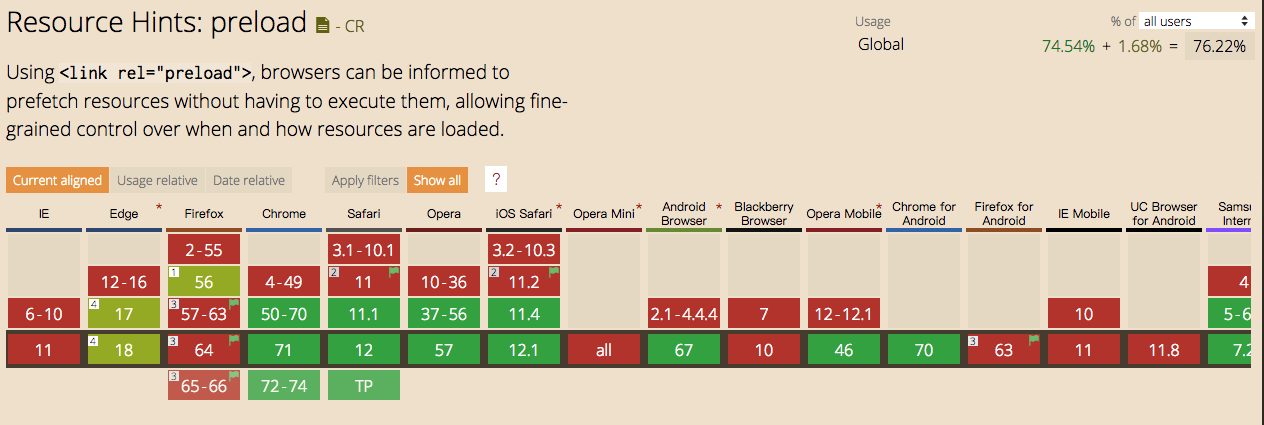
Translator's note: As of 2019/01/08, Preload's compatibility is as shown in the figure below:
热门文章
-
Nine Years of Bookkeeping: Changes in Tools, Methods, and Mindset
-
Fast and Slow
-
Using PVE to Run a Clash Bypass Router Virtual Machine for Transparent Proxying
-
Page Load Performance Optimization Solutions
-
Prismira: Two and a Half Years of Iteration and Growth
-
Hand-sized Mini PC Yunxuan H170 Usage Experience and Homelab Setup